"Camera is great, app to view, delete and share, not so good, I find it difficult to operate, I have four other cameras on Lorex Classic which is very easy to navigate, Lorex Connect needs to be more user friendly. Battery last about 2 to 3 days."
— Hilary L. (3/5)
Q&A
What type of battery does this camera use? How much is it?
The OC101A-BDW-AE1 camera has a built-in battery. For assistance in selecting the most compatible security system, please contact our Sales Team at 1-888-425-6739.
How do I access the videos or get notifications if away from the house and not near the wifi?
The OC101A camera must be connected to Wi-Fi in order to receive notifications and access the live view.
I have ordered 2 of these cameras to work a 16 channel fusion NVR, please tell me they are compatible with the fusion NVR.
The OC101A-BDW-AE1 camera is not compatible with fusion NVR recorders. For guidance in selecting the appropriate system, please contact our Sales Team at 1-888-425-6739.
Why Is Lorex a Leader in Home and Business Security?
Founded in Markham, Ontario, Canada over 30 years ago, Lorex has grown into a globally trusted provider of security cameras and complete security systems for homes and businesses. We’re known for delivering high-quality, DIY-friendly solutions that combine advanced technology, reliability, and user-focused design. Learn more about our journey on our About Us page.
Lorex products are available through our official online store, authorized retail partners, and select Marketplace Resellers, making it easy to shop with confidence. Customers consistently recognize our performance and service—see what they’re saying on Lorex Reviews.
With headquarters in Canada and the United States, distribution centers across North America, online availability in the United Kingdom, and retail presence in Australia, we provide fast, reliable service to customers worldwide. If you need assistance, visit our Contact Us page for support.
We are also deeply committed to protecting our customers. Learn more about our Privacy Commitment and Security Commitment, which outline how we safeguard your data and system integrity. Plus, customers can earn benefits through our Lorex Rewards program when shopping directly with us.
• IP Security Cameras & NVR Systems – Professional-grade systems with up to 32 cameras, delivering highest video quality and smartest features.
• Wired Analog (DVR) Security Cameras & Systems– Cost-effective, reliable 24/7 recording solutions ideal for upgrading existing coax-based systems and expanding coverage across large properties.
• Security Recorders – High-capacity Security NVRs and Security DVRs designed to store and manage your video footage efficiently.
• Video Doorbell Cameras – Enhance your front door security with two-way talk, motion detection, and HD video recording
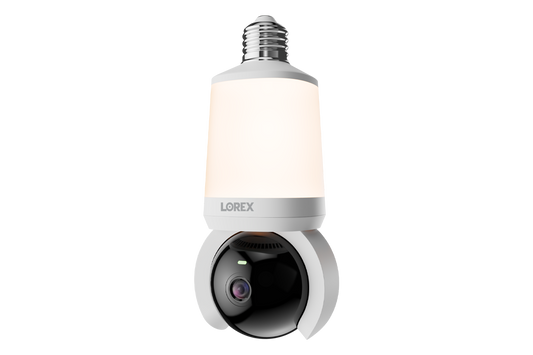
• Lightbulb Cameras - A perfect blend of smart security and smart lighting. Just screw in, connect to the app, and use the pan-tilt lens to get the ideal view.
• Smart Locks – Keyless convenience, remote access, and enhanced security for your doors.
Why do I need security cameras?
Investing in security cameras for your home or business offers several crucial benefits:
• Crime Deterrence – Visible security cameras can discourage potential intruders before they act.
• 24/7 Surveillance – Lorex security cameras provide high-quality recordings, including 4K video resolution and night vision, capturing every important detail.
• Remote Monitoring – Stay connected with your security system through Lorex mobile apps that allow real-time viewing from anywhere.
• Evidence Collection – In case of an incident, recorded footage can serve as vital proof for authorities.
• Peace of Mind – Enjoy enhanced home security and workplace safety with smart monitoring features like motion detection, two-way talk, and smart home integration.
Do Lorex security cameras support cloud storage?
Yes. Lorex offers optional Cloud Storage plans for select compatible Lorex Cloud Storage Security Cameras, providing an added layer of protection by securely storing recordings online. Cloud Storage helps keep footage safe in case of theft, damage, or local storage failure.
All plans include smart detection for people, vehicles, and animals, along with up to 60 days of event-based storage, while Premium plans offer up to 180 days of storage plus advanced features like AI Smart Search, AI Smart Alerts, and Professional Monitoring.
Lorex security cameras are designed for straightforward DIY installation, whether you’re setting up a wired security camera system, a wireless (Wi-Fi) camera, or a battery-powered camera. Installation typically involves mounting the camera, connecting it to power, and completing setup through a Lorex app and/or recorder interface. For wired systems, installation also includes running cables between cameras and the recorder for a stable, reliable connection. Many customers complete installation in just a few simple steps using basic tools.
If you prefer professional assistance, you can use our Find an Installer tool to locate certified installers in your area or explore InstallerNet options for convenient professional installation services.
What are Lorex’s different app ecosystems?
Lorex security products are organized into dedicated app ecosystems, with each app designed to support specific Lorex camera and recorder product lines. This helps ensure the best compatibility and user experience when viewing live video, managing settings, and accessing recordings.
Lorex Connect is our newest app ecosystem, built for the latest Lorex security products and advanced AI features. Lorex Classic (formerly the Lorex App) supports select legacy systems, including our Lorex Fusion product line. Lorex Pro is designed for professional-grade systems and is tailored for commercial and SMB security solutions.
To learn more about each ecosystem and find the right app for your system, visit our Lorex Mobile Apps page.
Are Lorex security cameras compatible with smart home devices?
• Amazon Alexa: Use voice commands to display live camera feeds on Alexa-enabled devices like Echo Show or Fire TV. • Google Assistant: View your security camera’s footage on Google Nest Hub or Chromecast-enabled devices with simple voice prompts.
By connecting Lorex cameras to your smart home devices, you can centralize your home automation system and monitor your property more efficiently. Compatibility may vary by camera model, so be sure to check product specifications.
Have more questions?
Visit our Frequently Asked Questions page for answers to common questions, or explore our Glossary to learn more about key security terms and features.
Choosing a selection results in a full page refresh.